Getting Started
Synapse has two parts:
- An MCP server. Your coding agent calls its tools to record its plan, its mental model of the code, and the files it touches.
- A live viewer. A local web page that draws all of that as a mindmap and updates as the agent works.
Both run from the synapse-mindmap npm package. You need Node.js 20 or newer.
1. Connect your agent
Run the installer:
npx synapse-mindmap initThe installer:
- Detects which supported clients are installed: Claude Code, Claude Desktop, Cursor, OpenCode, and Codex (which also covers the ChatGPT desktop app and the Codex IDE extension).
- Shows what it will change for each one and asks
Configure <name>? [Y/n]. - Backs up every config file it edits to
<file>.bak-<timestamp>. - Skips clients that already have a
synapseentry. Pass--forceto replace it. - Creates the data directory (
~/.synapse/databy default) and prints its location.
Then restart the client, or reconnect its MCP servers, so it starts the Synapse server.
Preview first
npx synapse-mindmap init --dry-run prints what would change without touching any files. To configure specific clients without prompts, use npx synapse-mindmap init --client cursor --client claude-code --yes.
To set up a client by hand, or to add one the installer doesn't automate (such as Windsurf), see Connecting Clients.
2. Open the viewer
npx synapse-mindmap viewer --openThe viewer runs at http://localhost:4040. If port 4040 is taken, it uses the next free port and prints the URL. It only accepts connections from your own machine. Leave it running in a terminal. It picks up new and updated mindmaps on its own, so you don't have to reload the page.
3. Give your agent a task
The Synapse server sends usage instructions to the client when it connects, so most agents start using it without extra prompting. Ask for something multi-step, for example:
Add rate limiting to the login endpoint. Track your plan in Synapse.
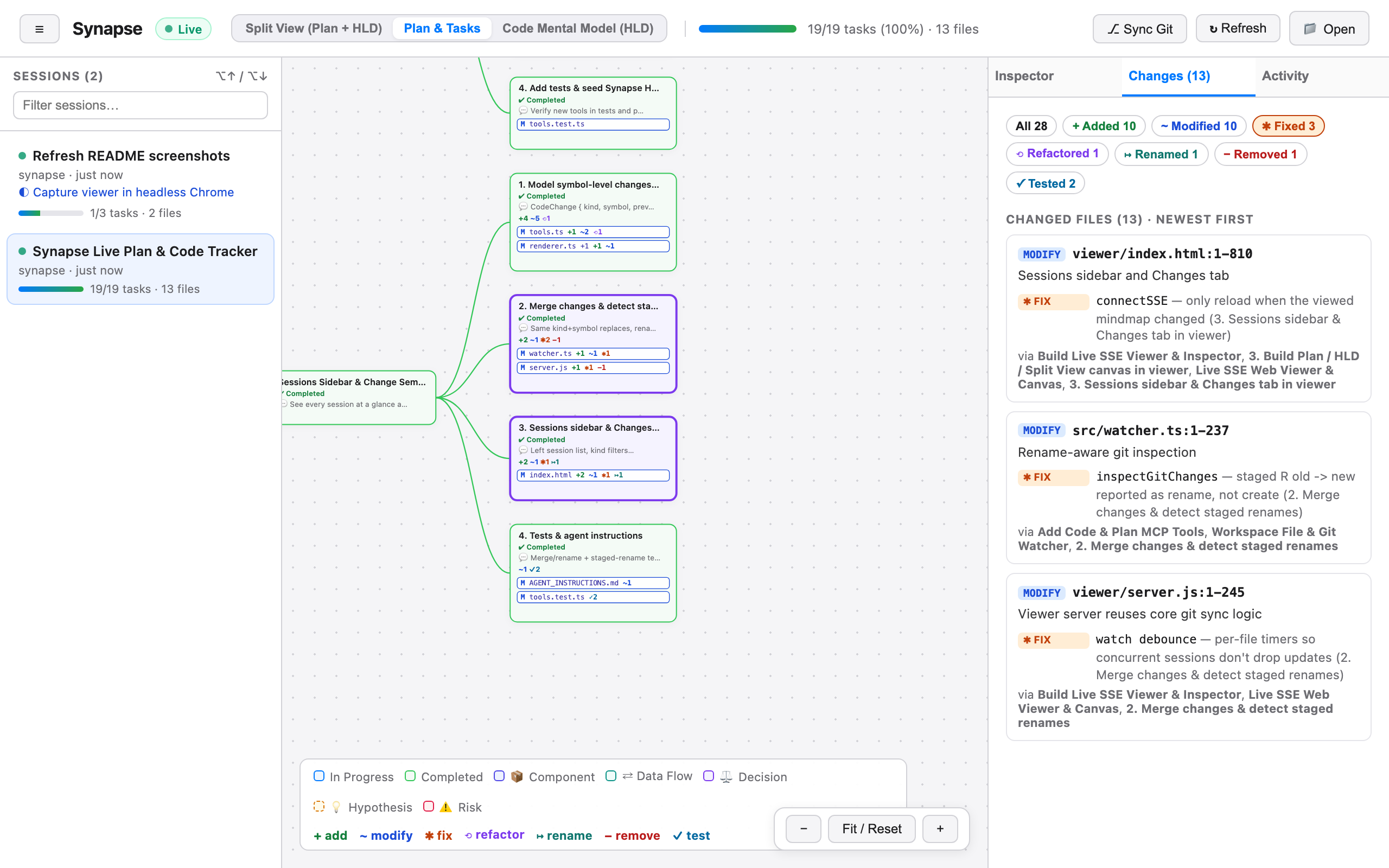
A typical session in the viewer looks like this:
- A new session appears in the left sidebar as soon as the agent calls
create_mindmap. Its plan steps show up under the root, with the first one in progress. - The mental model fills in. When the agent explores the code, it calls
map_architecture, and a "Code Mental Model (HLD)" branch appears. It holds components, data flows, decisions, hypotheses, and risks, connected by labeled arrows. - Files attach to tasks. Each
log_file_touchcall adds a file chip to the active task, along with a tally of changes such as+2 ✱1. Open the Changes tab to see every file and change, newest first. - Progress moves. When the agent calls
update_plan_status, the finished step turns green and the next one becomes active. The progress bar in the header updates.
If the agent doesn't use Synapse on its own, ask it to, or run the track-coding-plan prompt. For agents that need it spelled out, add the rules from Agent Instructions to your CLAUDE.md, AGENTS.md, or .cursorrules.
Where data lives
Mindmaps are stored as JSON files in ~/.synapse/data. Set SYNAPSE_DATA_DIR to use another directory. The MCP server and the viewer must point at the same directory, so if you change it for one, change it for both. See Connecting Clients → Custom data directory.
Next steps
- The Viewer: views, the Inspector, change filters, and keyboard shortcuts.
- How It Works: the architecture and data model.
- MCP Tools: every tool the agent can call.